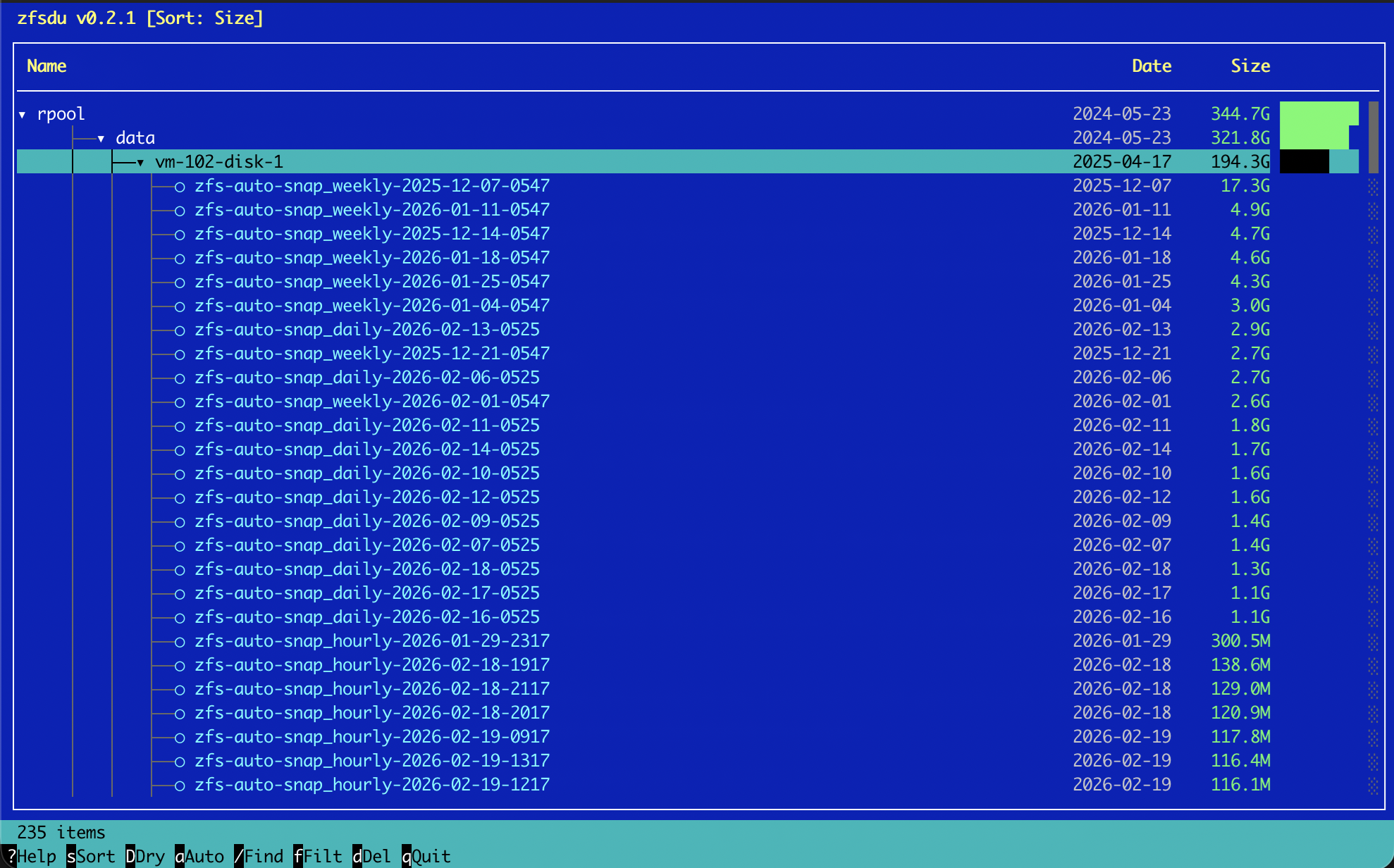
Every ZFS administrator knows the problem: zfs list shows datasets and snapshots, but without context. How much space does a single dataset consume relative to the pool? Which snapshots are the largest? Which ones can be safely removed?
zfsdu solves exactly this problem. This open-source tool by DATAZONE provides an interactive terminal user interface (TUI) for ZFS storage systems — comparable to the popular ncdu, but purpose-built for ZFS with integrated snapshot management.
What zfsdu Does
Hierarchical Navigation
zfsdu displays ZFS pools, datasets, and volumes as an expandable tree structure. Navigate the entire storage hierarchy using keyboard or mouse — including all snapshots. Relative sizes are visualised as bar graphs, making storage hogs immediately visible.
Snapshot Management
The core feature: snapshots can be marked and bulk-deleted directly in the interface. No more tedious assembly of zfs destroy commands. Before deletion, the built-in dry-run mode shows which snapshots would be affected — without actually executing anything.
Search, Sorting, and Filtering
Datasets and snapshots can be searched by name with the view filtered accordingly. Sorting toggles between size, creation date, and name — depending on what matters at the moment.
Additional Features
- Midnight Commander-style interface with mouse support
- Customisable colour schemes
- Auto-refresh (default: 30 seconds, configurable via
~/.config/zfsdu/config.toml) - Written in Rust — fast, safe, and resource-efficient
Installation
Install with a single command:
curl -sSL https://gitlab.datazone.de/kidev/zfsdu/-/raw/main/install-binary.sh | sudo bashAlternatively, build from source (Rust required):
git clone https://gitlab.datazone.de/kidev/zfsdu.git
cd zfsdu
cargo build --release
Requirements
- Linux with ZFS installed
- UTF-8 capable terminal
- Root privileges for snapshot deletion operations
Licence and Source Code
zfsdu is released under the CDDL licence — the same licence as OpenZFS itself. The full source code is available at: gitlab.datazone.de/kidev/zfsdu
Conclusion
Anyone who regularly works with ZFS snapshots — whether on TrueNAS, Proxmox, or plain Linux systems — gains a tool with zfsdu that noticeably simplifies day-to-day operations. Instead of cryptic one-liners in the terminal, you get a clear, interactive interface with real added value.
DATAZONE supports you with setting up and optimising your ZFS environment — get in touch for a no-obligation consultation.
More on these topics:
More articles
ZFS vs. Btrfs vs. ext4: Which Linux Filesystem for Which Job in 2026?
ZFS vs Btrfs vs ext4 — an honest 2026 comparison: features, maturity, snapshots, send/receive, encryption, and where ext4 is still the right choice.
TrueNAS vs QNAP in the Enterprise: Where QNAP Ends and ZFS Begins
TrueNAS vs QNAP compared for the enterprise: QuTS hero, OpenZFS, dual-controller HA and support SLAs. An honest look at TrueNAS as a QNAP enterprise alternative.
On-Premises vs. Cloud: Where Local TrueNAS Storage Beats the Cloud
The cloud is not always the best choice. Where on-premises storage with TrueNAS wins on cost, data sovereignty, performance, control and resilience — and when hybrid is the smartest answer.